使用smartupload.jar实现文件上传
1.将jar包添加到项目中:smartupload.jar
2.准备上传的页面
1
2
3
4
5
| <form action="toUpload" method="post" enctype="multipart/form-data" >
书名:<input type="text" name="bookName"/><br>
图片:<input type="file" name="自定义名称"/><br>
<input type="submit" value="提交"/>
</form>
|
注:(1)form标签中要添加enctype属性
(2)提交方式必须是post
3.开始获取数据,保存文件
实例代码:
1
2
3
4
5
6
7
8
9
10
11
12
13
14
15
16
17
18
19
20
21
22
23
24
25
26
27
28
29
30
31
32
33
34
35
| public void upload(HttpServletRequest request, HttpServletResponse response)
throws ServletException, IOException {
try {
SmartUpload su=new SmartUpload();
JspFactory factory=JspFactory.getDefaultFactory();
PageContext pagecontext=
factory.
getPageContext(this, request,response,
null,false,1024,true);
su.initialize(pagecontext);
su.setCharset("utf-8");
su.upload();
File file = su.getFiles().getFile(0);
String filename=file.getFileName();
String type=file.getContentType();
System.out.println("type="+type);
String url="uploadfile/"+filename;
file.saveAs(url, SmartUpload.SAVE_VIRTUAL);
request.setAttribute("filename",filename);
String uname=su.getRequest().getParameter("uname");
System.out.println("uname="+uname);
request.getRequestDispatcher("success.jsp").forward(request, response);
} catch (SmartUploadException e) {
e.printStackTrace();
}
}
|
注:(1)此时如果表单中有其他数据时,不能通过request直接获取,需要通过SmartUpload对象获取
String name=su.getRequest().getParameter(“bookName”);
并且该代码要在SmartUpload操作完成后添加
(2)解决乱码:
new String(name.getBytes(“GBK”),”utf-8”)
注:斜杠方向:/
注意:
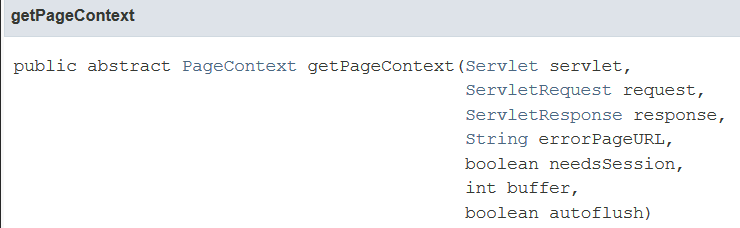
| 参数 |
含义 |
| servlet |
请求的servlet,在servlet中传this即可 |
| request |
servlet上挂起的当前请求 |
| response |
servlet上挂起的当前响应 |
| errorPageURL |
请求JSP的错误页面的URL,或null |
| needsSSession |
是否需要session |
| buffer |
以字节为单位的缓冲区大小 |
| autoflush |
缓冲区应该在缓冲区溢出时自动刷新到输出流,还是抛出IOException |
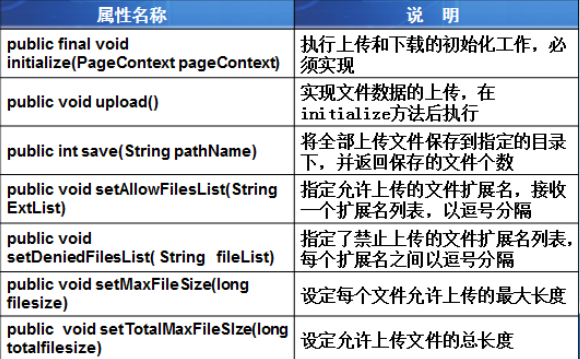
smartupload常用方法
文件下载
1
2
3
4
5
6
7
8
9
10
11
| String name=request.getParameter("filename");
String url="uploadfile/"+name;
response.setContentType("application/octet-stream");
name=URLEncoder.encode(name,"utf-8");
response.addHeader("Content-Disposition","attachment;filename="+name);
request.getRequestDispatcher(url).forward(request, response);
response.flushBuffer();
|
1024,